Summarize the post with AI
We’re excited to announce the release of Batu LMS v1.0.2. This update makes it easier for learners to sign up, gives course sellers stronger tools, and gives LMS owners more control over authors, courses, and reports.
This release adds Google and Facebook sign-in, course duplication and approval, enrollment limits, import and export for the Question Bank, four new reports, a new coupon system, and storage limits for authors. We’ve also refreshed several admin screens with a cleaner, more modern design.
Batu LMS v1.0.2 Changelog
Before getting into the details of Batu LMS v1.0.2, here’s a quick look at what’s included in this update. It’s a long list of features. Stay focused during the read.
Added: “Continue with Google” sign-in on the login page’s Sign In and Sign Up screens.
Added: “Continue with Facebook” sign-in on the login page’s Sign In and Sign Up screens.
Added: Social Login section in Settings > Appearance to turn Google and Facebook sign-in on or off and enter each app’s keys.
Added: Duplicate button on the wp-admin Courses list and the Author dashboard that copies a whole course as a new draft and opens it for editing.
Added: Admin approval for courses made by Authors — they stay drafts until the owner or a site admin approves them.
Added: Approve and Reject options in the wp-admin Courses list, with “Pending approval” and “Rejected” badges.
Added: Enrollment Limit option in Settings > Appearance.
Added: Enrollment limit field in the Course Builder’s Specification card (wp-admin and Author dashboard), showing how many seats are taken.
Added: “Only X seats left” tag on the course list and course page for seat-limited courses, and a “Fully booked” state once every seat is sold.
Added: “Log in” button on the checkout confirmation when an account was created for the buyer, opening the Sign In page.
Added: Export Questions on the Question Bank screen — download all templates, only Quiz or Exam templates, or chosen templates as a CSV.
Added: Import Questions on the Question Bank screen — upload a CSV to add questions to existing templates or new draft templates, with a report of any skipped rows.
Added: Sample CSV download showing the Import Questions format.
Added: Employees report on the Reports & Analytics dashboard — enrollments, completions, mandatory courses done, learning hours, and last activity for every employee.
Added: Learning Hours report — total hours, lessons completed, hours by month, top learners, and hours by course, for any date range.
Added: Engagement report — active learners, sign-ins, lessons completed, quiz attempts, discussion posts, reviews, a monthly breakdown, and the most engaged learners.
Added: System report for the Owner and Platform Staff — software versions, Batu LMS data size, sign-in security, recent backups, and recent system activity.
Added: Reports view on the Company Dashboard with the company’s own Employee, Learning Hours, and Engagement reports.
Added: CSV download, Generate Report, and saved reports for the four new reports.
Added: Course-specific coupons — limit a coupon to chosen courses; only those courses are discounted.
Added: “Have a coupon?” box on the checkout page, with the discount shown in the order summary.
Added: Author storage limits — turn them on under Settings > Storage and set a default limit for every author.
Added: A Storage card when editing an author in Batu LMS > Users, to give them the default, a custom limit, or unlimited storage.
Added: A Storage meter on the Author Dashboard and Content Library, and each author’s usage under their role in the Users list.
Added: Uploads that would go over an author’s storage limit are blocked with a clear message; files already uploaded are never removed.
Updated: A seat-limited course can’t be added to the cart, checked out, or bought once its seats are sold out.
Updated: The Course Builder’s Specification card (Status, Price, Free, Difficulty, Enrollment limit) now uses the same modern, compact rounded fields and dropdowns as Settings > Appearance, in wp-admin and the Author dashboard.
Updated: Logging out from anywhere now takes you to the Batu LMS Sign In page.
Updated: The course page shows “Awaiting payment” to a student whose Cash on Delivery order isn’t confirmed yet, instead of offering the course again.
Updated: The Status dropdown in Billing’s Edit Transaction Status window now uses the same modern dropdown as the Reports & Analytics filters.
Updated: Question Bank template builder now shows the questions on the left and the quiz settings on the right, in the same design as the Course Builder’s quiz editor.
Updated: Question Bank template builder fields now use the LMS’s modern style, with the Dashboard’s dropdowns and small Shuffle question / Instant Results chips on one row.
Updated: The Add/Edit Coupon window now sets the company, courses, total uses, uses per person, and expiry date in one place, in the LMS’s modern design.
Updated: The coupon list shows which courses a coupon covers, uses per person, its end date, and Expired / Used up badges.
Updated: The Add/Edit User screen in Batu LMS > Users now uses the LMS’s modern fields and the Dashboard’s dropdowns for Role, Status, and Company, with short fields grouped two or three to a row.
Updated: Editing a company in Batu LMS > Users now shows the same Company Details and Contact Information fields as adding one.
Fix: Login card now sits exactly in the center of the screen, with no extra scrolling on desktop.
Fix: A course with no learning outcomes now says “Learning outcomes not set yet.” on its page instead of showing sample points.
Fix: Courses bought with Cash on Delivery now appear on the student’s dashboard as “Pending payment” instead of being missing, with learning blocked (“Awaiting payment”) until the payment is confirmed.
Fix: A single quiz, exam, or template shortcode ([batuedu_assessments id=”…”]) now works on any page — standalone ones open to any signed-in learner (or the owning company’s members), ones inside a course to enrolled learners.
Fix: Coupons made under Billing > Coupons now work at checkout and in My Billing, with their usage limits, expiry, company, and course rules enforced and each use counted.
Faster Sign-Up With Google and Facebook
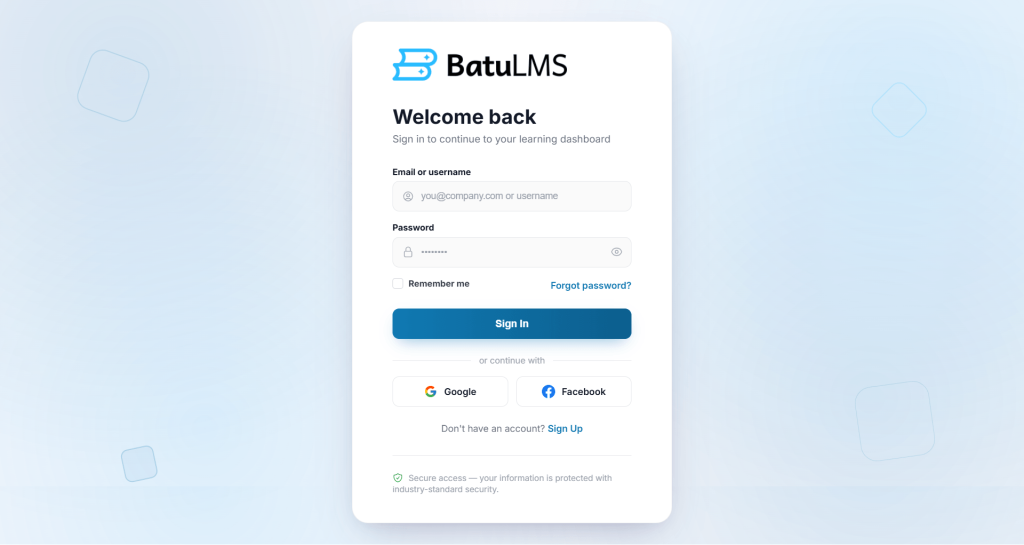
Every extra step at sign-up can cost you a learner. With Batu LMS v1.0.2, learners can now sign in or create an account with Google or Facebook in a single click.
You can turn each option on or off from the new Social Login section in Settings > Appearance, where you can also enter your app keys. Both buttons appear on the Sign In and Sign Up screens.
We’ve also polished the login experience. The login card now sits exactly in the center of the screen, and logging out from anywhere takes users straight back to the Batu LMS Sign In page.
Duplicate Courses in One Click
Building a new course that’s similar to an existing one used to mean starting from scratch. Now you don’t have to with Batu LMS v1.0.2.
The new Duplicate button copies a whole course as a new draft and opens it straight away for editing. It’s available on the Courses list in wp-admin and on the Author dashboard.
Stay in Control of What Authors Publish
If several authors create courses on your platform, you’ll want a say in what goes live. In Batu LMS v1.0.2, courses created by Authors stay as drafts until the owner or a site admin approves them. You can approve or reject a course right from the Courses list, and clear “Pending approval” and “Rejected” badges show where each course stands.
Limit Seats and Create Urgency
Some courses work best with a limited number of learners, such as live cohorts, workshops, or premium programs. And we have introduced the solution in Batu LMS v1.0.2.
You can now turn on Enrollment Limits under Settings > Appearance and set a seat limit for any course in the Course Builder, where you’ll also see how many seats are already taken.
Learners see an “Only X seats left” tag on the course list and course page. Once every seat is sold, the course shows as “Fully booked” and can no longer be added to the cart, checked out, or bought.
Coupons That Work Everywhere
Coupons are one of the easiest ways to drive sales, and in Batu LMS v1.0.2 they’re far more capable. The Add/Edit Coupon window now lets you set everything in one place:
- Company-specific coupons: only members of a chosen company can use them.
- Course-specific coupons: only the courses you pick are discounted.
- Usage limits: set total uses and uses per person.
- Expiry dates: a coupon stops working at the end of the day you choose.
Learners can apply a coupon from the new “Have a coupon?” box on the checkout page and see their discount right in the order summary. Every rule is checked again when the order is placed, and each use is counted.
The coupon list also shows which courses each coupon covers, its per-person limit, its end date, and “Expired” or “Used up” badges, so you can see at a glance which coupons are still active.
Control How Much Authors Can Upload
Videos, documents, and resources can fill up your server quickly when many authors are uploading.
Batu LMS v1.0.2 introduces Author Storage Limits. Turn them on under Settings > Storage and set a default limit for every author. You can also give any author their own custom limit, or unlimited storage, from Batu LMS > Users.
Authors see a Storage meter on their dashboard and in their Content Library, which turns amber when space is running low and red when it’s full. Any upload that would go over the limit is blocked with a clear message, and files that are already uploaded are never removed.
Four New Reports for Deeper Insights
v1.0.1 brought revenue and sales reporting. This release adds four more reports to help you understand how your platform is being used:
- Employees report: enrollments, completions, mandatory courses done, learning hours, and last activity for every employee.
- Learning Hours report: total hours, lessons completed, hours by month, top learners, and hours by course, for any date range.
- Engagement report: active learners, sign-ins, lessons completed, quiz attempts, discussion posts, reviews, and your most engaged learners.
- System report: software versions, Batu LMS data size, sign-in security, recent backups, and recent system activity, available to the Owner and Platform Staff.
All four work with CSV download, Generate Report, and saved reports. Companies also get their own Reports view on the Company Dashboard, with their Employee, Learning Hours, and Engagement reports.
Import and Export Your Question Bank
Moving questions between sites or editing them in bulk is now much easier.
You can export all your templates, only Quiz or Exam templates, or just the ones you choose, as a CSV file. You can then edit them in any spreadsheet and bring them back with Import Questions, either into existing templates or as new draft templates.
A sample CSV shows the exact import format, and after each import you get a report of any rows that were skipped.
A Better Question Bank Builder
The Question Bank template builder has been redesigned to match the Course Builder’s quiz editor. Questions now appear on the left, quiz settings on the right, and every field uses the LMS’s modern style.
We’ve also fixed quiz and exam shortcodes. A single quiz, exam, or template can now be placed on any page. Standalone ones are open to any signed-in learner, or to the owning company’s members, and ones inside a course are open to enrolled learners.
Smoother Cash on Delivery Purchases
Learners who pay with Cash on Delivery now see their course on their dashboard right away, marked “Pending payment”. Learning stays locked until the payment is confirmed.
The course page shows “Awaiting payment” instead of offering the course again. If an account was created during checkout, the confirmation now includes a “Log in” button that takes the buyer to the Sign In page.
A Cleaner, More Modern Admin
Throughout this release, we’ve brought more screens in line with Batu LMS’s modern design:
- The Course Builder’s Specification card now uses compact, rounded fields and dropdowns.
- The Add/Edit User screen has modern fields, the Dashboard’s dropdowns for Role, Status, and Company, and short fields grouped two or three per row.
- Editing a company now shows the same Company Details and Contact Information fields as adding one.
- Billing’s Edit Transaction Status window uses the same modern dropdown as the Reports & Analytics filters.
Small Improvements That Make a Difference
Along with the major features, this release includes several smaller fixes. Courses without learning outcomes now say “Learning outcomes not set yet.” instead of showing sample points.
Wrapping Up
Batu LMS v1.0.2 is about growth and control. Social login and smarter coupons help you bring in more learners. Course approval, enrollment limits, and storage limits keep you in charge of your platform. And four new reports, plus Question Bank import and export, save you time every day.
If you’re already using Batu LMS, update to Batu LMS v1.0.2 and explore the new features. If you’re just getting started, this release makes Batu LMS an even stronger foundation for running a professional WordPress LMS website.
For more updates, follow us on Facebook.